Planning an exhibition, whether it’s a small-scale art show or a large-scale trade fair, can be overwhelming. One crucial element often overlooked amidst the chaos of logistics and marketing is a well-organized exhibit list. A comprehensive and well-structured exhibit list template is your secret weapon for maintaining clarity, streamlining communication, and ensuring a smooth, successful event. This article will guide you through creating and utilizing an effective exhibit list template to manage your exhibition effortlessly.
What is an Exhibit List Template and Why Do You Need One?
An exhibit list template is essentially a pre-formatted document designed to catalog and organize all the components of your exhibition. It serves as a central hub for information, eliminating the risk of crucial details falling through the cracks. Imagine trying to manage a complex exhibition with scattered notes, emails, and spreadsheets – it’s a recipe for disaster. An exhibit list template provides a structured system to consolidate all this information into one easily accessible document.
Think of it as your exhibition’s digital blueprint. It not only lists the exhibits themselves – their titles, descriptions, and artists or creators – but also tracks vital logistical details such as dimensions, placement, insurance information, and even contact details for exhibitors. This level of organization reduces stress, saves time, and ultimately contributes to a higher-quality exhibition experience for both organizers and attendees.
Key Elements of a Comprehensive Exhibit List Template
A truly effective exhibit list template requires more than just a simple list of items. It needs to incorporate several key elements to ensure its usefulness. Consider including the following fields:
Exhibit ID: A unique identifier for each exhibit.
Exhibit Title: The official name of the exhibit.
Exhibit Description: A concise description of the exhibit’s content.
Artist/Creator: The name(s) of the person(s) responsible for the exhibit.
Dimensions (Height x Width x Depth): Crucial for space planning and transportation.
Materials: Essential for insurance purposes and handling instructions.
Weight: For logistical purposes, particularly transportation and setup.
Insurance Information: Policy number and contact information for the insurer.
Contact Person: Name and contact details for the exhibitor or responsible party.
Location/Booth Number: Assigned space within the exhibition venue.
Special Requirements: Any specific needs, such as power outlets, lighting, or security.
Installation Instructions: Detailed instructions for setting up the exhibit.
Removal Instructions: Instructions for disassembling and removing the exhibit.
Utilizing Spreadsheets for Your Exhibit List Template
Spreadsheets like Microsoft Excel or Google Sheets are excellent tools for creating an exhibit list template. Their inherent structure allows for easy organization, data sorting, and filtering. You can easily customize columns to fit your specific needs, adding or removing fields as required. Furthermore, spreadsheets allow for easy data manipulation and sharing. Multiple team members can access and update the spreadsheet simultaneously, promoting collaboration and maintaining a single source of truth.
Remember to save your spreadsheet regularly and consider creating backup copies to protect your data. You might even want to explore different spreadsheet functionalities, such as conditional formatting, to highlight important information or potential issues.
Beyond the Basics: Enhancing Your Exhibit List Template
While the basic elements are crucial, you can elevate your exhibit list template to become an even more powerful tool. Consider these enhancements:
Images: Including images of each exhibit can significantly improve visual clarity and aid in the identification process.
Categories/Tags: Categorizing exhibits based on themes, materials, or artists can facilitate search and filtering.
Checkboxes: Add checkboxes to track tasks such as confirmation of participation, exhibit delivery, and setup completion.
Formulas: Utilize spreadsheet formulas to automate calculations, such as total weight or space occupied.
Data Validation: Implement data validation to prevent errors, such as incorrect data types or inconsistent formatting.
Sharing and Collaboration with Your Exhibit List Template
Effective communication is vital for a smooth exhibition. Sharing your exhibit list template with relevant parties – artists, venue staff, and other organizers – is crucial. Using cloud-based solutions like Google Sheets allows for real-time collaboration and simultaneous updates. Everyone involved can access the most current information, ensuring everyone is on the same page. This eliminates potential misunderstandings and ensures a streamlined process. Clearly defining access permissions is vital to maintain the integrity of the data.
While spreadsheets are a widely used and effective option, other software solutions can enhance your exhibit list management. Database programs, project management software, or even dedicated exhibition management platforms offer different functionalities and features. The best choice depends on the size and complexity of your exhibition and your specific needs. Consider factors such as the number of exhibits, the level of collaboration required, and your existing technological infrastructure.
Maintaining Your Exhibit List Template After the Exhibition
Once the exhibition concludes, don’t discard your exhibit list template. Instead, archive it for future reference. It serves as a valuable record of the exhibition, offering insights into logistics, scheduling, and resource allocation. This historical data can be invaluable when planning future exhibitions, allowing you to learn from past experiences and improve your processes. Consider adding a section to your template for post-exhibition notes and feedback to further enhance your future planning efforts. This meticulous record-keeping will greatly enhance the efficiency and success of your future endeavors. Remember, a well-maintained exhibit list template is an investment in the smooth running of your exhibitions, year after year.
Exhibit List Template FAQ
Here are some frequently asked questions about creating and using an exhibit list template:
What is an exhibit list template?
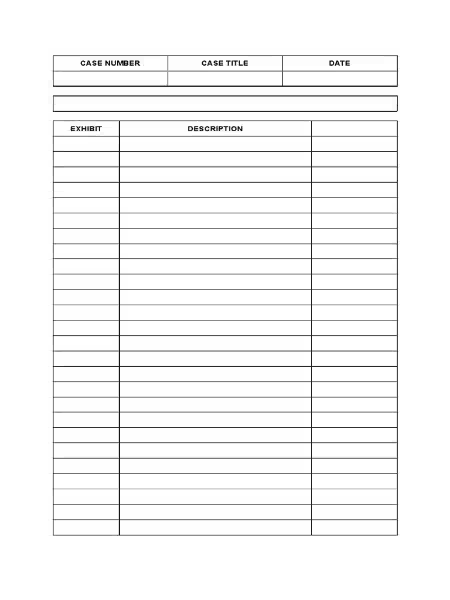
An exhibit list template is a pre-formatted document designed to help you organize and track exhibits (documents, images, physical objects, etc.) used as evidence or supporting materials in a formal setting, such as a legal case, a scientific presentation, or a business proposal. It provides a structured way to list each exhibit, assigning it a unique identifier, describing its content, and noting its location or custody. This ensures efficient management and easy retrieval during the process.
Why should I use an exhibit list template?
Using a template offers several key advantages: It ensures consistency in formatting, reduces the risk of errors and omissions, simplifies the process of tracking exhibits, and facilitates easy referencing during presentations or proceedings. A well-organized exhibit list saves time and minimizes confusion, making your work more efficient and professional.
What information should my exhibit list template include?
A comprehensive exhibit list template should, at minimum, include the following information for each exhibit:
Exhibit Number: A unique identifier (e.g., Exhibit A, Exhibit 1, etc.).
Description: A concise but descriptive title or summary of the exhibit’s content.
Type of Exhibit: Specify the type (e.g., document, photograph, email, physical object).
Source: Where the exhibit originated from (e.g., witness testimony, company records).
Custodian: The person or entity responsible for the exhibit’s safekeeping.
Location: The physical or digital location of the exhibit.
You can find various exhibit list templates online through searches on platforms like Google Docs, Microsoft Word templates, or specialized legal or business resource websites. Many are free to download and customize. Consider searching for terms like “exhibit list template,” “legal exhibit list,” or “evidence log template.”
Can I customize an exhibit list template?
Absolutely! Most templates are designed to be customized. You can adjust the columns, add or remove fields, change the formatting, and adapt the template to meet the specific requirements of your project. This ensures it accurately reflects the information you need to track.
What software can I use to create or edit an exhibit list template?
Common software options include Microsoft Word, Google Docs, Excel, and specialized database programs. Choose the software you’re most comfortable with and which best suits your needs. Microsoft Word and Google Docs are particularly user-friendly for creating and editing templates.
How do I ensure my exhibit list is accurate and up-to-date?
Maintain meticulous accuracy throughout the process. Regularly review and update the list as new exhibits are added or changes occur. It’s crucial to cross-reference the list with the actual exhibits to ensure everything is accounted for and accurately described. Consider using a version control system if working collaboratively on the list.
What if I have a large number of exhibits?
For a large number of exhibits, consider using a spreadsheet program like Microsoft Excel or Google Sheets, or a database management system. These programs offer features for sorting, filtering, and searching, making it easier to manage a large volume of data. You might also consider using specialized software designed for legal case management.
Leaving federal service after 10 years is a significant life decision, often accompanied by questions about benefits and future prospects. While you might not be eligible for immediate retirement, numerous advantages remain accessible, depending on your circumstances. This article clarifies your options and helps you navigate this transition. Health Insurance After Leaving Federal Service One…
The term “Pegasus” refers to multiple distinct pieces of software, causing considerable confusion. This article clarifies the differences between the open-source workflow management system, the seismology app, and the infamous spyware. Understanding these distinctions is crucial to avoid misinterpretations and to address security concerns appropriately. This article will cover each type of “Pegasus” software, explaining…
Finding the right legal representation can be daunting. When facing complex legal challenges, choosing an attorney with the right experience and expertise is crucial. This article aims to provide insight into the legal services offered by Attorney Jonathan Stovall, whose firm, Galmor Stovall & Gilthorpe, Attorneys at Law, serves clients throughout Texas. The Breadth of…
Are you drowning in a sea of paperwork? Does the thought of tackling your home filing system fill you with dread? You’re not alone! Many people struggle with organizing their important documents. This article provides a simple yet effective system to help you conquer your paper clutter and finally achieve a manageable home filing system….
Program coordination is a vital function within educational settings, impacting everything from curriculum development to student support services. But what exactly does it entail, and what qualifications are needed? This article will delve into the multifaceted role of a program coordinator, clarifying its responsibilities and the necessary credentials. The Role of a Program Coordinator Program…
Many people struggle financially, often blaming external factors like a poor economy or low wages. But what if the real problem isn’t the money itself, but rather our relationship with it? This is the central idea behind the transformative concept that “el dinero no es el problema tú lo eres.” This article explores this perspective,…